





1-Right click on the icon image above and click on Save Image As…
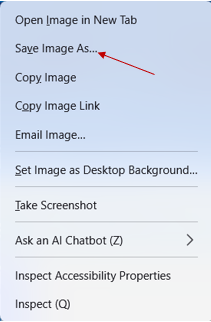
2-Save the image to your Pictures folder, this will be used later for the desktop icon.

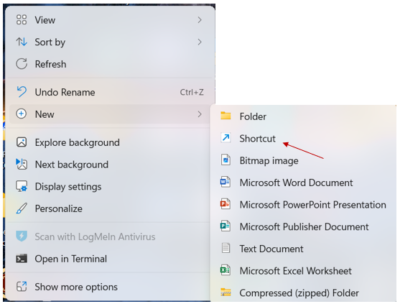
3-Right click on an empty area of your desktop. Hover on New and slide over to Shortcut-click on it.
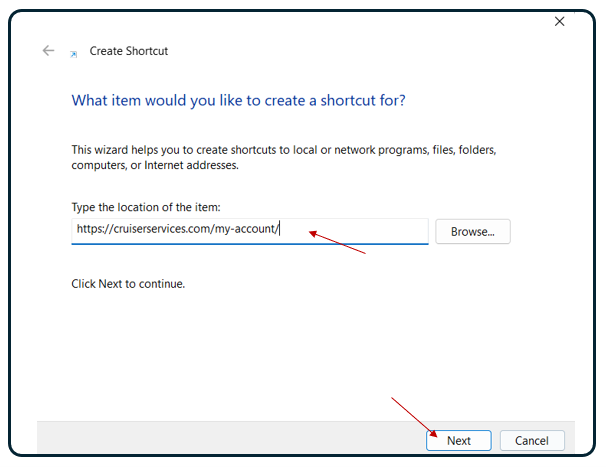
4-Enter this URL: http://cruiserservices.com/my-account/ on the next screen in box labeled “Type the location of the item” Then Click Next to continue.
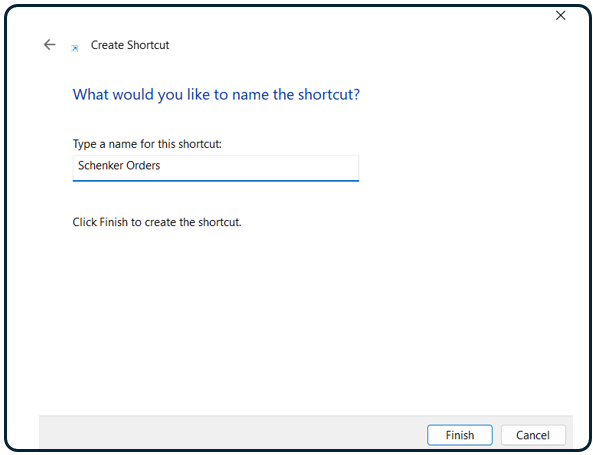
5-Now Name the Short Cut: Schenker Orders
6-The shortcut has been created. You can now assign the icon you saved to your Picture folder earlier.

Right click on the new shortcut and click on properties
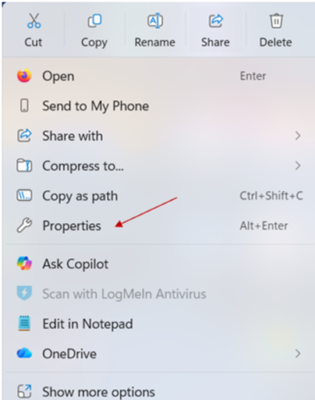
Now click on the Change Icon tab
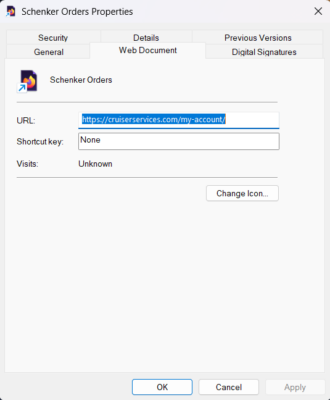
Navigate to your pictures folder and click on the saved icon.

Click on OK

Click on Apply

Click on OK

Language
Help With Support / Ordering-Ping Rich
1
Questions? Rich Can Answer 7Days A Week
Hi it's Rich 👋Sure I can help! Try me here on WhatsApp - Just Click On The Green Ping Rich Button Below.
If you don't have WhatsApp you will need to install it on your phone first. You can download the app to your phone on the next screen. Just click on the green Ping Rich button.
If you already have it on your phone you can link it to your computer.
It's the standard way people communicate worldwide without cost.
If your a cruiser its a must!

Click the X at upper right to close this portal.
I never share or sell any of your information. Any Information you provide is to help you with your customer service needs. I use WhatsApp because I typically carry my phone at all times. It works everywhere even on most planes for the text message feature.